ERROR OCURRED

  • Subscribe to our RSS feed.
  • Twitter
  • StumbleUpon
  • Reddit
  • Facebook
  • Digg

Monday, September 5, 2011

Fix MBR in Win XP

Posted on 12:27 PM by Unknown
How to fix MBR in Windows XP:

What is the MBR? MBR stands for Master Boot Record and it’s the first sector of your hard drive that basically tells the BIOS where to look for the operating system on your computer.

If, for any reason, the MBR becomes damaged or corrupt, then the operating system will be unable to load.

Corruption is definitely not fun, especially if you are not familiar with computers. Most people would automatically assume their computers are dead! However, that’s not true. Being in IT myself, these errors are actually preferably to other types of Windows errors. Why?

Well, it’s actually fairly easy to fix the Master Boot Record in XP and Vista. All you have to do is load up the Recovery Console and run a simple command. All of your data, applications, settings, etc are still intact on the drive and once the MBR is fixed, the computer will load normally.

So how can you repair your damaged MBR? Here are the steps to follow:

1. First, restart your computer with the Windows XP setup disk in the CD drive. If you don’t have your original disk, borrow one or download a ISO image from a torrent site.

2. When prompted, boot from the CD drive by pressing any key. If Windows loads automatically, you will first have to enter the BIOS setup and change the order of the boot devices to start with the CD drive.
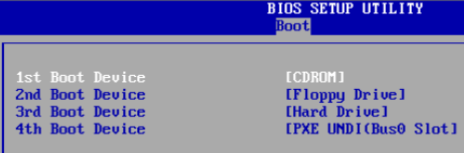
change boot order

3. Once the setup loads, you will see the option to press R to repair a Windows installation.
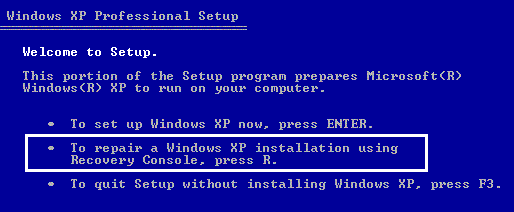
repair windows

4. Once the Recovery Console loads up, you will have to type in a number that corresponds to your Windows installation. This is normally just 1. Press Enter and then type in the Administrator Password.
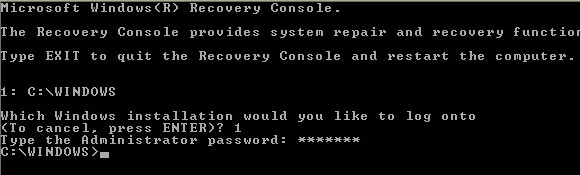
recovery console

5. Now at the prompt, type in fixmbr. Your damaged MBR will now be replaced with a new master boot record and your computer should now be able to boot properly. Note that you may also want to run the fixboot command to repair the boot sector with a new one.

Also, make sure you only use these commands on a system with one operating system installed. If you have more than one operating system installed, fixmbr and fixboot could mess up everything.
Email ThisBlogThis!Share to XShare to FacebookShare to Pinterest
Posted in | No comments
Newer Post Older Post Home

0 comments:

Post a Comment

Subscribe to: Post Comments (Atom)

Popular Posts

  • No package 'lua5.1' found
    hecking for LUA51... no checking for LUA51... configure: error: Package requirements (lua5.1 >= 5.1) were not met: No package 'lua5.1...
  • response to SOA query was unsuccessful: solved
    check your zone file [root@inf1sysadm1 data]# pwd /var/named/data # cat ind.raman.com.zone $ORIGIN . $TTL 3600 ; 1 hour ind.raman.com IN SO...
  • can't locate your x11 installation Fedora
    While install Conky, system through this error. Solution:- You need to install X11 Software Dev Package. Login on system with root user ...
  • Qmail Installation & Configuration step by step
    Tested under CentOS 5.8  64bit machine. 1)Packges which i installed for Qmail. httpd-2.2.3-76 php-5.1.6-39 perl-5.8.8 -38 gcc-4.1.2 mysql-5....
  • Dell MD3200 SAS Cabling With Diagram
    I have 2 MD3200 with SAS Ports + 2 Power Edge720. Task to connect Both DAS with Both server and make sure Both server showing  all DAS Parti...
  • It is safe to clean windows prefetch folder and registry folder ?
     It is safe to clean windows prefetch folder and registry folder ? Will this boost Windows operating system capabilities ? Many of you hav...
  • Windows 7 & Windows 8 fail to start
    Windows 7 fail to boot, what should I do? Is Windows 7 failing to boot after you installed the loader or after you just installed a fresh ne...
  • Steps how to change VolStatus in Bacula through bonsole.
    In my example MediaId=4 or Volumename=000018L4 shows volstatus is Purged. *list volumes Pool: Default +---------+------------+-----------+--...
  • Adobe Photoshop CS5 Error 16 , Adobe Photoshop CS5 Error 7
    When you install Adobe Photoshop CS5 you might get some errors. In case you get one you will see a code and a little description. Is very im...
  • X connection to localhost:10.0 broken (explicit kill or server shutdown).
    Solution:- With Xhost, you can solve this issue.

Categories

  • Adobe
  • Players
  • Reviews
  • Windows

Blog Archive

  • ►  2013 (27)
    • ►  October (3)
    • ►  August (1)
    • ►  June (1)
    • ►  April (3)
    • ►  February (10)
    • ►  January (9)
  • ►  2012 (29)
    • ►  December (2)
    • ►  November (7)
    • ►  October (10)
    • ►  September (4)
    • ►  August (1)
    • ►  June (2)
    • ►  April (1)
    • ►  March (1)
    • ►  January (1)
  • ▼  2011 (36)
    • ►  December (3)
    • ►  November (3)
    • ►  October (1)
    • ▼  September (5)
      • Wireless Laptop Switch Quick Fix
      • Compare and check High speed Internet in your area
      • Dell Latitude D600 "A DISK READ ERROR OCURRED. Pre...
      • Fix MBR in Win XP
      • Windows Boot up issue
    • ►  August (4)
    • ►  May (2)
    • ►  April (4)
    • ►  March (5)
    • ►  February (2)
    • ►  January (7)
  • ►  2010 (24)
    • ►  December (1)
    • ►  November (1)
    • ►  October (4)
    • ►  August (1)
    • ►  May (1)
    • ►  April (1)
    • ►  March (2)
    • ►  February (5)
    • ►  January (8)
  • ►  2009 (18)
    • ►  December (6)
    • ►  November (3)
    • ►  August (1)
    • ►  July (2)
    • ►  June (1)
    • ►  May (1)
    • ►  April (1)
    • ►  March (1)
    • ►  February (1)
    • ►  January (1)
  • ►  2008 (16)
    • ►  December (1)
    • ►  October (1)
    • ►  August (1)
    • ►  July (5)
    • ►  April (2)
    • ►  February (1)
    • ►  January (5)
  • ►  2007 (4)
    • ►  July (3)
    • ►  June (1)
Powered by Blogger.

About Me

Unknown
View my complete profile